Built for small sites, too
CROAI uses Bayesian statistics and shows how sure it is as visitors come in, so smaller sites can test too. If a page stays quiet, the test ends after 30 days and keeps whichever version is ahead.
AI that rewrites your headlines and text, tests variations, and deploys winners automatically. No coding required.
By continuing, you agree to the Terms and Privacy Policy.
CRO is conversion rate optimization: testing different versions of a page to learn which one more of your visitors act on. CROAI brings AI into that work. It writes the new versions, tests them on your real visitors and shows the winner to everyone.
Testing versions of your pages to see which one more visitors sign up, buy or get in touch from.
Writes new versions of your headlines and text, and with Auto AI keeps writing new challengers.
One tool built for this one job: it writes the versions, runs the test and shows the winner to everyone.
Add one line of code and pick the text you want to test. CROAI writes new versions, splits your visitors between them, and shows the winner to everyone.
Paste our script into your site. It works with Shopify, WordPress, Payly or any website.
Open your page in the visual editor and click a headline, button or paragraph. No code, no developer.
CROAI's AI suggests new versions. Use them, edit them, or write your own.
Visitors are split between the versions. When one is a clear winner, CROAI shows it to everyone automatically.
Turn on Auto AI and CROAI writes and tests a new challenger after each win, for up to five rounds.
CROAI's script is small, and the snippet you install keeps your page hidden until the test version is in place. Visitors don't see your old text change.
CROAI uses Bayesian statistics and shows how sure it is as visitors come in, so smaller sites can test too. If a page stays quiet, the test ends after 30 days and keeps whichever version is ahead.
Turn on Auto AI and CROAI writes, tests and rolls out new versions by itself, building on each winner for up to five rounds.
Pick from the AI's suggestions, edit them, or write your own. Or turn on Auto AI and let CROAI choose.
See how each version does on engagement, clicks and conversions, and how sure CROAI is about the winner.
Many testing platforms are priced for large companies. CROAI starts free and grows with your traffic.
| Feature | CROAI | Mida | Webflow Optimize | Coframe | Kameleoon |
|---|---|---|---|---|---|
| Starting price | Free, then $49/mo | Free, then $299/mo | $299/mo, billed yearly | Not published | $495/mo after a 30-day trial |
| Sign up without a sales call | Webflow sites only | Get a demo | |||
| Works on any website | |||||
| AI-written headlines and copy | |||||
| Click-to-edit visual editor | — | Enterprise plan | |||
| Winners go live automatically | One click, Paid plan | After your approval | Enterprise or add-on |
From each company's own website, November 2026. — means we couldn't confirm it there. Plans change, so check their sites for the latest.
Compare one by one: CROAI vs Mida CROAI vs Webflow Optimize CROAI vs Coframe CROAI vs Kameleoon CROAI vs VWO CROAI vs Optimizely
Pick the plan that fits your traffic. No contracts, and you can upgrade anytime.
Try CROAI on your website
For growing stores and businesses
For agencies and high-traffic sites
More than 500,000 monthly visitors? Let's talk.
“I founded this company in 2025 because I saw small businesses getting left behind by expensive A/B testing tools.”
Quick answers to common questions. Can't find what you're looking for? Send us a message.
Contact supportCROAI works on any website where you can add one line of code, from online stores to service businesses. The Starter plan is free, so you can try it on your own site first.
You can still test. CROAI uses Bayesian statistics and shows how sure it is as visitors come in, so smaller sites can test too. With less traffic a test takes longer, and if a page doesn't get enough visitors in 30 days, the test ends and keeps whichever version is ahead.
It depends on your traffic and on how differently the versions perform. Busy pages can find a winner in days; quieter pages take longer. Every test ends within 30 days.
None. If you can copy and paste one line of code, you can use CROAI. Our visual editor handles everything else.
Start on the free Starter plan and upgrade only if it's working for you. There are no contracts.
Add one line of JavaScript to your site's <head>. Our docs have step-by-step guides for Shopify, WordPress and any other website.
CROAI's script is small and loads asynchronously, so your page doesn't wait for it, and it's served from Cloudflare's global network.
Our pricing is based on the number of unique visitors per month, counted across all your websites together. We count each visitor once a month, the first time they visit a page you're testing. We offer three tiers: Starter (up to 10K visitors, free), Growth (up to 25K visitors), and Pro (up to 500K visitors). Going over your plan's visitors for one month is fine. If you go over two months in a row, new tests pause until you upgrade or a new month starts. Your winning versions keep showing.
Yes. Our Starter plan is completely free, with up to 10,000 monthly visitors and 2 monthly experiments. No credit card required to get started.
Start with one headline. CROAI writes the new versions, runs the test and shows you which one wins.
Starter plan free foreverNo credit cardEverything you need to get started with A/B testing and website optimization
CROAI tests different versions of your website's text to find the one that works best. You click the headline or text you want to improve, write new versions yourself or let the AI write them, and CROAI shows each version to a share of your visitors. It measures what those visitors do, uses statistics to pick the winner, and then shows the winning version to everyone.
Installing the script and launching your first test usually takes about 5 minutes. The Quick Start walks you through it.
Unlike traditional A/B testing tools, CROAI brings AI and simplicity to website optimization:
CROAI's AI reads your page and writes new versions of your copy in one click. Turn on Auto AI and it keeps writing and testing new versions on its own for up to five rounds, building on each winner.
Paste one script into your site, click what you want to test, and go live. There's no code to write and nothing to install on your server.
No thank-you page to track? CROAI can still pick a winner from clicks on your buttons, or from how far visitors scroll, how long they stay and how much they click.
When a test finds a winner, CROAI starts showing it to every visitor straight away. There's nothing to copy across and no developer to wait for.
Add the CROAI script to the <head> of your website. See the guides for any website, Shopify and WordPress.
Open a page in the Page Editor and click the headline or text you want to improve.
Write new versions yourself or generate them with AI (see Creating Variants), then click Save & Go Live.
Your visitors are split between the versions. When one wins, CROAI shows it to everyone. Follow a test on the Active tests page while it runs; when it ends, it moves to Winners.
Set up CROAI and launch your first test in about 5 minutes
After you sign up, you start on the Websites page.
https:// and be your main domain or a subdomain, such as https://example.com or https://shop.example.com.thank-you. CROAI counts a visit to that page as a conversion. You can also set a different one for each page later.CROAI shows you a short script. Click Copy, paste it into the <head> section of your website, and publish the change. There are step-by-step guides for any website, Shopify and WordPress.
Click Verify Installation. CROAI loads your homepage and checks that the script is in its <head>.
If verification fails, check that:
<head> section, not the bodyThen click Try Again. You can also come back later: until it passes, the website's card shows Retry Verification.
pricing, or leave it empty for your homepage.The Page Editor and Creating Variants guides cover each step in detail.
Click Save & Go Live. The test starts on your live site straight away, and the page's card shows Test In Progress. Follow the results on the Active tests page. When CROAI finds a winner, it shows it to all your visitors automatically, and the test moves to Winners.
Install CROAI on any website
CROAI works automatically once installed. Paste this code into the <head> section of your website, as high up as you can, on every page you want to test. Most sites share one header or layout file between pages, so you only need to add it once.
<script> // CROAI
!function(){
var e=document.createElement("style");
e.id="croai-antiflicker";
e.innerHTML="html { visibility: hidden !important; transition: none !important; } body { visibility: hidden !important; }";
var n=function(){
var e=document.getElementById("croai-antiflicker");
e&&e.parentNode&&e.parentNode.removeChild(e)
};
document.head.appendChild(e);
var t=setTimeout(n,2000);
document.addEventListener("croai:ready",(function(){
clearTimeout(t),n()
}));
window.CROAI_ANTIFLICKER={show:n}
}(); </script>
<script async src="https://croai.com/croai.js"></script>
This is the same code the portal gives you when you add a website, laid out to be easier to read. Either version works.
Add the code directly to your site's HTML rather than through a tag manager. A tag manager loads it too late to prevent the flash, and CROAI's installation check can't see it there.
When the code is live, go back to the portal and click Verify Installation.
Install CROAI on your Shopify store by editing your theme
You add the CROAI script to your theme's theme.liquid file, which Shopify includes on every page of your store. No app is needed.
theme.liquid.</head> tag and paste the CROAI script (shown below) on the line just above it.Shopify recommends duplicating your theme first so you have a backup. If you later switch themes or update yours, check that the script is still in theme.liquid, because theme updates can remove code changes.
Copy this script and paste it into theme.liquid:
<script> // CROAI
!function(){
var e=document.createElement("style");
e.id="croai-antiflicker";
e.innerHTML="html { visibility: hidden !important; transition: none !important; } body { visibility: hidden !important; }";
var n=function(){
var e=document.getElementById("croai-antiflicker");
e&&e.parentNode&&e.parentNode.removeChild(e)
};
document.head.appendChild(e);
var t=setTimeout(n,2000);
document.addEventListener("croai:ready",(function(){
clearTimeout(t),n()
}));
window.CROAI_ANTIFLICKER={show:n}
}(); </script>
<script async src="https://croai.com/croai.js"></script>
Shopify doesn't run theme code on its checkout and order confirmation pages, so CROAI can't see visits to them and they won't work as a conversion page. Instead, mark your Add to cart or Buy it now button as a CTA in the Page Editor, and CROAI counts clicks on it.
Install CROAI on your WordPress website using a plugin
The easiest and safest way to install CROAI on WordPress is with a plugin that adds code to your site's header, so you don't have to edit your theme.
The script is now included on every page of your website.
Copy this script and paste it into the Header Footer Code Manager snippet:
<script> // CROAI
!function(){
var e=document.createElement("style");
e.id="croai-antiflicker";
e.innerHTML="html { visibility: hidden !important; transition: none !important; } body { visibility: hidden !important; }";
var n=function(){
var e=document.getElementById("croai-antiflicker");
e&&e.parentNode&&e.parentNode.removeChild(e)
};
document.head.appendChild(e);
var t=setTimeout(n,2000);
document.addEventListener("croai:ready",(function(){
clearTimeout(t),n()
}));
window.CROAI_ANTIFLICKER={show:n}
}(); </script>
<script async src="https://croai.com/croai.js"></script>
Choose what to test by clicking it on your live page
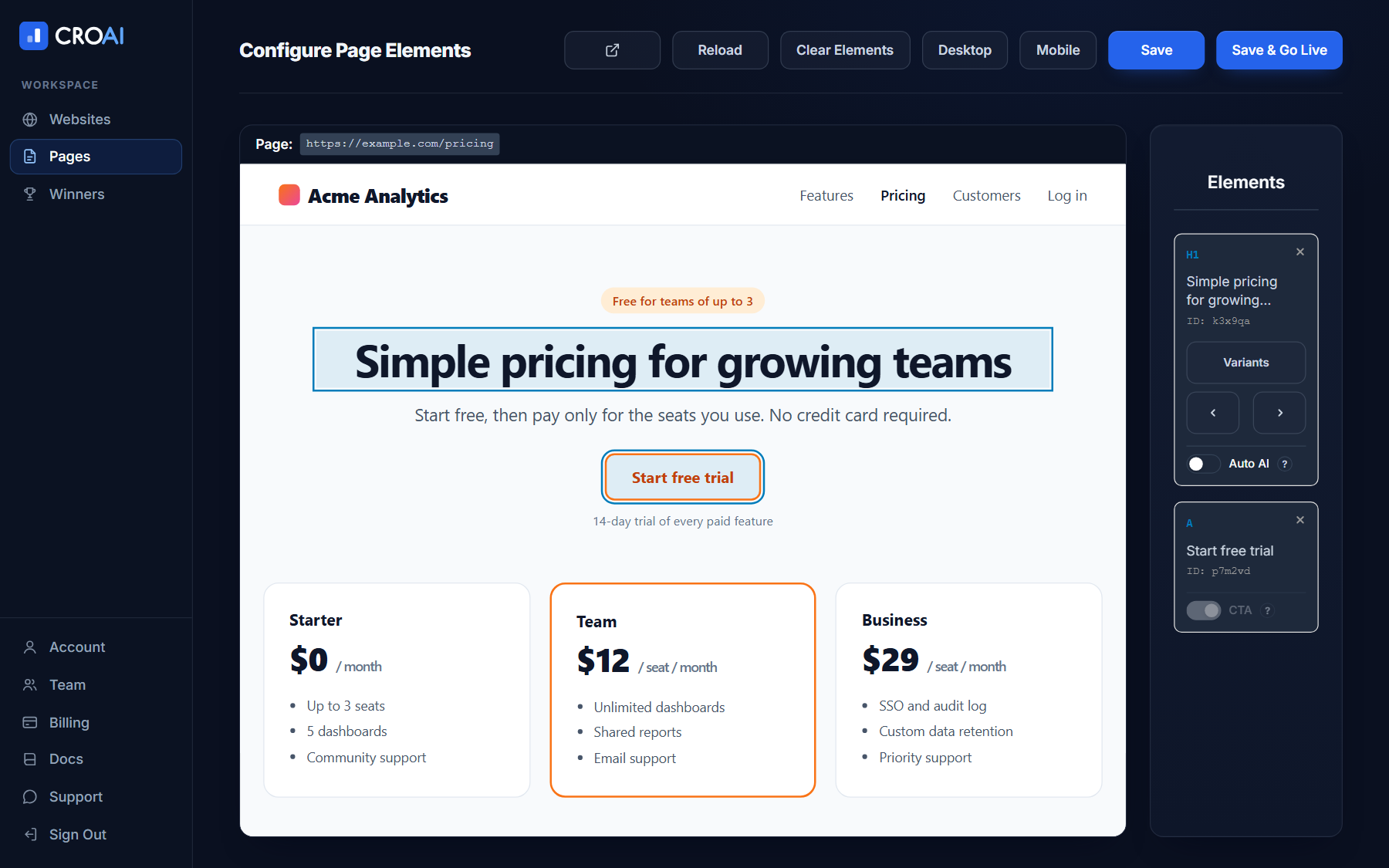
The Page Editor shows your real page inside CROAI. Click the text you want to test, mark the buttons you want to track, and add variants, all without touching your site's code.
You can't change a page while its test is running, so its card shows Cancel Test instead of Configure. Cancelling stops the test, deletes its variants and results, and removes any winner CROAI is showing on that page. It can't be undone.
The Page Editor needs the CROAI script on the page. If it isn't there, you'll see CROAI Script Not Detected instead of your page.
Click anything on your page to add it to the Elements list on the right. What happens depends on what you click:
To test a button's own text instead, turn off its CTA switch. You can only do that while no other element on the page is being tested, so do it before you click any text.
Hover over a card in the list to highlight its element on the page.
| Button | What it does |
|---|---|
| ↗ (open) | Opens the page on your site in a new browser tab. |
| Reload | Reloads the page preview. |
| Clear Elements | Removes every element from the list. |
| Desktop / Mobile | Shows the preview at desktop or phone width. |
| Save | Saves your elements without going live. |
| Save & Go Live | Saves and starts the test on your live site. |
You need at least one variant to go live. If you haven't marked a CTA, CROAI also asks whether you'd like to add one: click No, Continue to go live without one, or Cancel to go back and add it.
Write new versions of your text, or let the AI write them
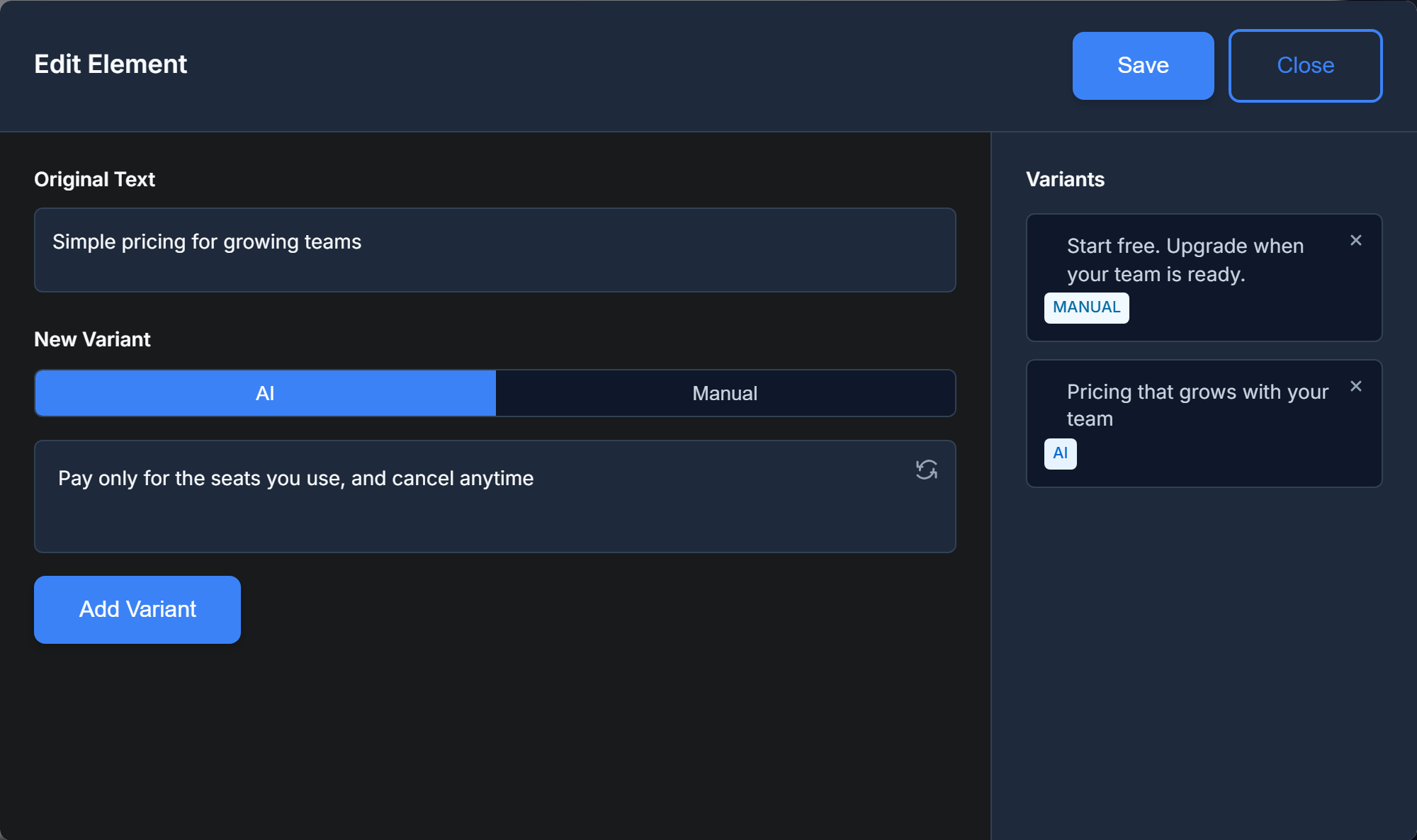
A variant is a new version of the text you're testing. CROAI shows your original and each variant to an equal share of your visitors, so you can add one variant or several.
New variants aren't kept until you click Save in the Edit Element window. If you close the window first, they're discarded.
Click Generate AI Suggestion and CROAI's AI writes a new version of your text. It reads your page's title, description, headings and main content, so the suggestion fits the page. With Use existing variants as input for suggestions turned on, it also sees the variants you already have and suggests something different.
Not quite right? Click the refresh button next to the suggestion to get another. If you'd like to adjust the wording, copy the suggestion, switch to Manual and edit it there.
Choose Manual, type your text, and click Add Variant. Use this when you have a specific idea to test, or wording that has to be exact.
How CROAI runs your tests and picks the winner
When you click Save & Go Live, the CROAI script starts showing each visitor either your original text or one of your variants. Visitors are split evenly between the versions, and each visitor keeps seeing the same version when they come back on the same browser.
CROAI records what visitors do on the page (how far they scroll, how long they stay and what they click) and whether they go on to your conversion page. It analyzes the results automatically using Bayesian statistics, so you don't need to watch the test yourself.
Once a winner is confirmed, the test ends and CROAI shows the winner to all your visitors automatically.
Tests also end after 30 days. If no winner has been confirmed by then, CROAI keeps whichever version is ahead and shows it to everyone.
While a test runs, its card on the Active tests page shows where it is:
| Progress shows | What's happening |
|---|---|
| No progress | The test has only just gone live and CROAI hasn't analyzed it yet. |
| Collecting data | The test has just started and the first visits are coming in. |
| Collecting data: 40% | CROAI is waiting until every version has had enough visitors to compare. The bar fills as they arrive. |
| Analyzing: 80% | Every version has enough visitors and CROAI is comparing them. The bar fills as one version pulls ahead. |
| Verifying: 90% | One version is ahead with enough confidence, and CROAI is checking that it stays ahead. |
| 🏆 Winner Found! | The winner is confirmed and is now shown to all visitors. The test moves to the Winners page. |
| No data available | No visits to this page have been recorded yet. Check that the CROAI script is on the page. |
When a test reaches the 30-day limit without a confirmed winner, it ends and moves to the Winners page. The version that was ahead is shown to all visitors, and the test's card says it reached 30 days.
See how every test is doing and which versions won
Click Manage Pages on a website, then Active tests or Winners in the left menu.
A test moves from Active tests to Winners when it ends. Use the filter at the top to show a single page.
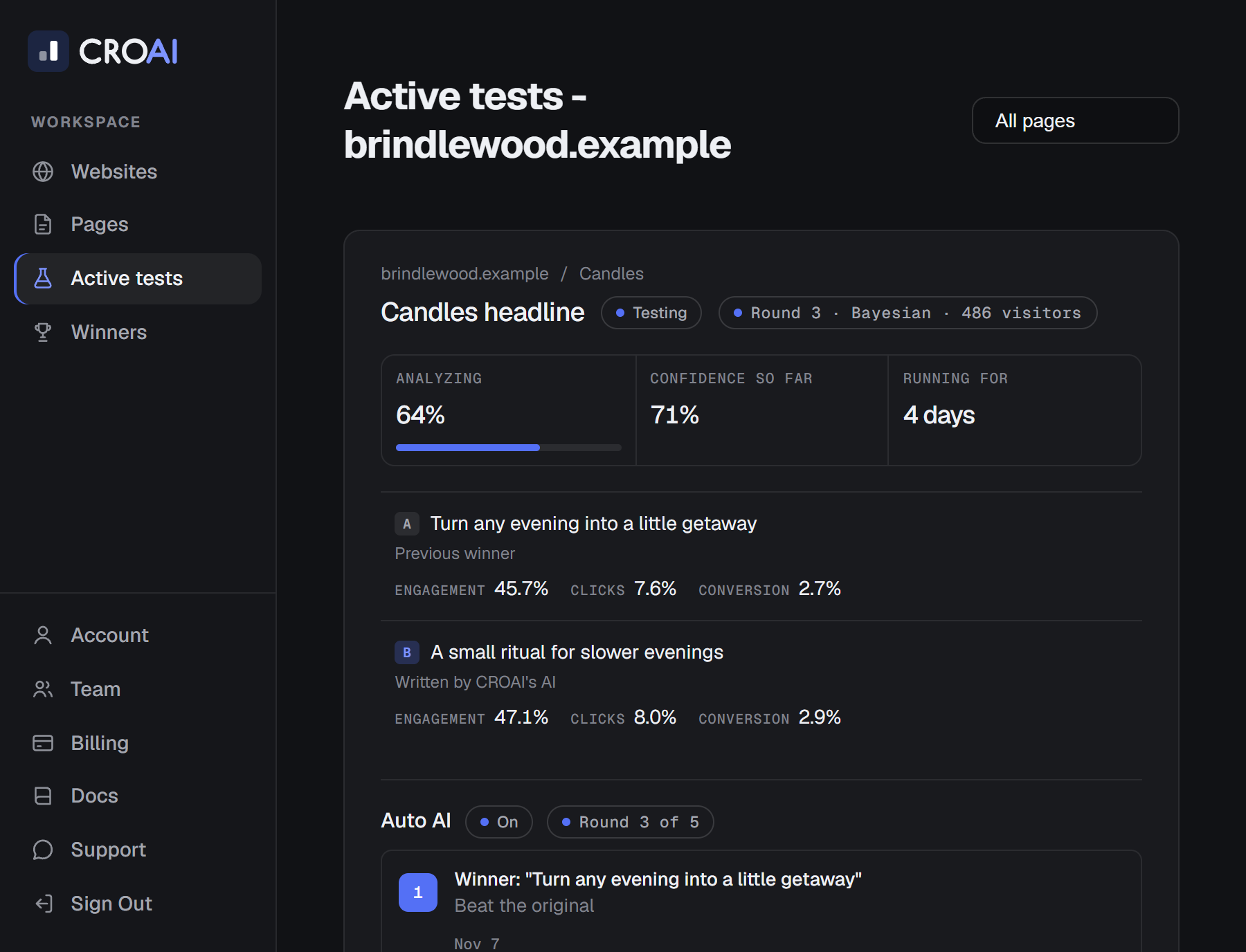
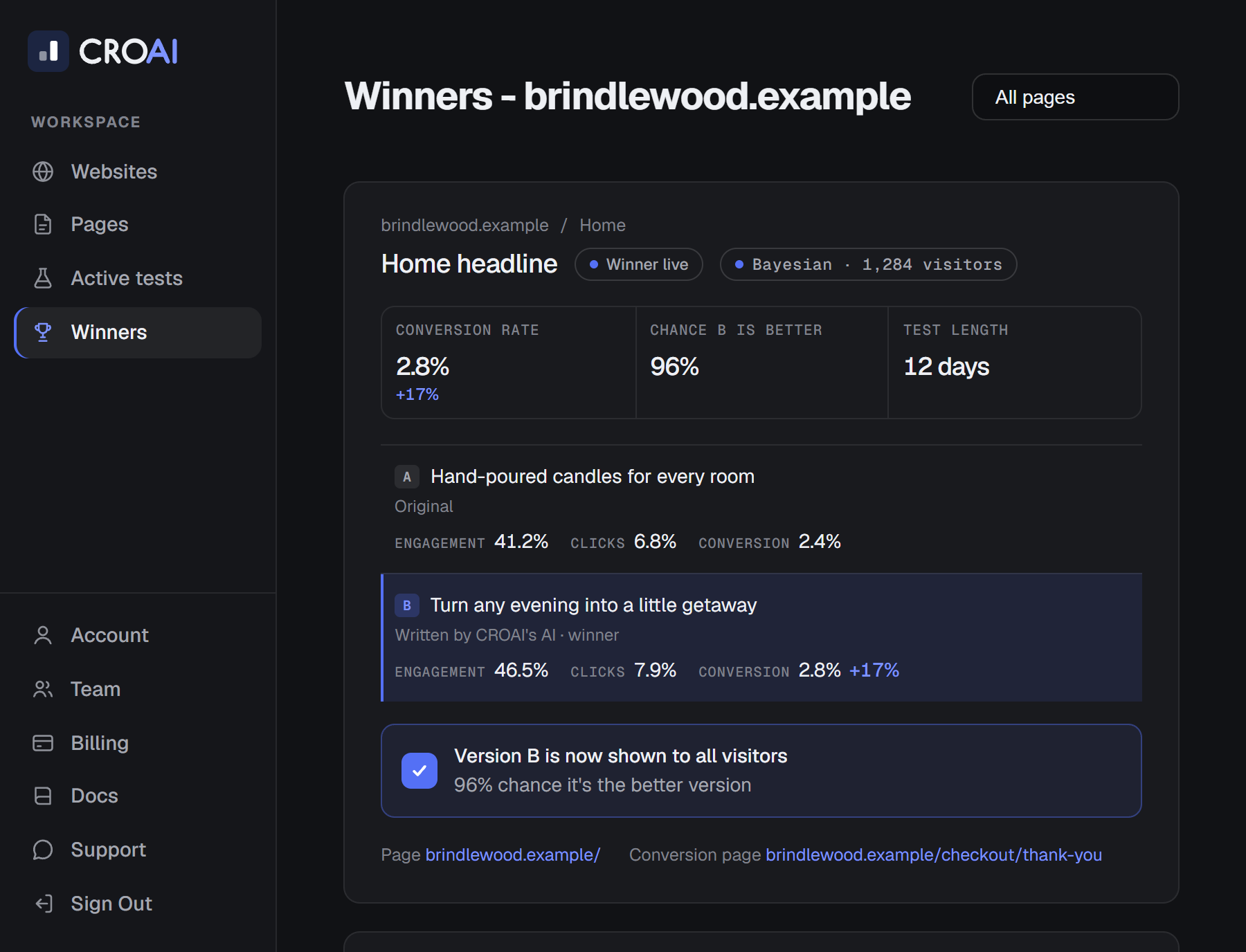
Each test has a card with the page it's on, a name such as Home headline, and its status:
Next come the key numbers. While a test runs, they're its stage, such as Analyzing 64% (A/B Testing explains each stage), the confidence so far and how long it has been running. Once it has finished, they're the winning version's main rate and how much better it did, how sure CROAI is that it's better, and how long the test ran.
The table lists each version with a letter and a label: Original, Written by you, Written by CROAI's AI or Previous winner. Its columns are the scores:
The winning version is highlighted and marked winner, and the line under the table says what happened, such as Version B is now shown to all visitors.
A test with Auto AI turned on lists its rounds under the table, such as Round 3 of 5: each round's winner, the challenger being tested now and the next one to come. Once a test has been through more than one round, click a round to see its versions and scores in the card.
How CROAI picks a winner when there are no conversions to count
Not every page has a thank-you page to track. CROAI still finds winners on those pages by looking at what visitors do: whether they click your CTAs, how far they scroll, how long they stay and how much they click.
CROAI compares versions using the strongest signal the test has:
| When the test has | CROAI mainly compares |
|---|---|
| Conversions | Conversion rate, with CTA clicks and engagement also counted |
| CTA clicks, but no conversions | CTA click rate, with engagement also counted |
| Neither | Engagement |
Conversions are visits to your conversion page, and the CTA click rate is the share of visitors who clicked a button or link you marked as a CTA in the Page Editor. So you choose the kind of test by what you set up: add a conversion page to test for conversions, mark a CTA to test for clicks, or leave both out and CROAI compares engagement.
CROAI measures four things for every visitor to the page:
How far down the page visitors scroll. Scrolling further means they're reading more of your content.
How long visitors stay on the page. Longer visits usually mean more interest.
How many times visitors click on the page. More clicks suggest visitors are exploring.
Clicks on the buttons and links you marked as CTAs, even when they don't lead to a conversion. These show high-intent visitors.
CROAI averages scroll depth, time on page and clicks across each version's visitors, scales them to the same range so they can be compared fairly, and combines them into one engagement score. The Active tests and Winners pages show it in each version's Engagement column, such as 41.2%.
Engagement-based testing uses the same statistical methods as conversion testing:
Say you're testing two headlines on a blog post that has no conversion page and no CTA:
Result: the AI variant beats the original on scroll depth, time on page and clicks, so it has the higher engagement score. Once enough visitors have seen both versions and CROAI is confident the lead is real, it declares the AI variant the winner.
Engagement testing suits pages where reading and exploring is the goal. Conversion testing suits pages that ask visitors to do something. To test for conversions, set a conversion page for the page or website.
Let CROAI write and test new versions for you, round after round
With Auto AI on, CROAI keeps improving the element you're testing on its own. Each time a test ends, CROAI's AI writes a new variant and starts a new test of the current winner against it, without asking you first. It runs up to five rounds, then switches itself off.
Each round goes like this:
The element's current test finds a winner, or reaches the 30-day limit.
It starts from the winning text and the versions already tested, and writes something new that aims to beat the winner.
The winner and the new variant each get half of your visitors, and CROAI picks a winner the usual way (see A/B Testing).
Whichever version wins stays live, and the next round starts, up to five rounds in all.
Auto AI runs at most five rounds on a page. That keeps changes to a steady pace and gives you a natural point to review the results. After the fifth round, Auto AI switches itself off and the last winner stays live.
A test with Auto AI lists its rounds on its card: on Active tests while it runs, then on Winners. Click a round to see what the AI tried, how each version scored and which one won.
A page can't be changed while its test is running, and with Auto AI on, a new test starts as soon as the last one ends. To stop Auto AI early, click Cancel Test on the page's card, then open the page in the Page Editor and turn off Auto AI.
Cancel Test stops testing immediately, deletes the page's variants and results, and removes any winner CROAI is showing on that page, so visitors see your original text again. It can't be undone.
Collaborate with your team members
Invite team members to collaborate on your optimization projects:
Team members can work on every website in your account.
Can do everything a Team Member can, and can also invite, edit and remove team members and manage billing.
Full access to websites, pages and tests, but can't manage the team or billing.
Can see websites, pages and test results, but can't make changes.
Your plan sets how many people can be on your team, and the count includes you:
The Team page shows how many places you've used. To add more people, upgrade your plan on the Billing page.
Fix common problems and debug the CROAI script
CROAI checks your homepage's HTML for the script. Make sure it's inside the <head>, pasted into your site's HTML rather than added through a tag manager, and published. If your site uses a caching plugin or CDN, clear it, then click Try Again (or Retry Verification on the website's card).
The page you're editing doesn't have the CROAI script. Add it to that page too (most sites add it to a shared header so every page has it), publish, and try again.
Configure only appears on pages without a test. While a test is running, the page's card shows Cancel Test instead, because pages can't be changed mid-test; cancelling stops the test, deletes its variants and results, and brings Configure back. When a test has finished, the card shows Winner Found with View Details, which takes you to its results.
CROAI hasn't recorded any visits to that page yet. Check that the script is on that exact page, then visit it yourself and come back later.
If something isn't working as expected, debug mode shows what the CROAI script is doing on your page.
?croai_debug=true added to the end of its addressDebug mode shows:
If your website is https://example.com, use:
https://example.com?croai_debug=true
If the address already has a ?, add it with & instead:
https://example.com/products?category=shoes&croai_debug=true
To compare with your original page, add ?croai_bypass=true to its address. CROAI doesn't run at all, so you see the page exactly as it is without any tests. The page can take up to 2 seconds to appear, because the first part of the CROAI code waits for the script that this switches off.
Still stuck? Contact support and include the address of the page and what the debug-mode console shows. It helps us find the problem much faster.
Frequently asked questions about CROAI
CROAI is designed not to. It only changes the text of the element you're testing, in the visitor's browser. It doesn't change your URLs or redirect anyone, it treats search engines the same as any other visitor, and every test ends within 30 days.
CROAI needs enough visitors to each version before it can compare them reliably, and more when the versions perform about the same or when you test several variants at once. Tests end after 30 days, so if a page doesn't get enough visitors in that time, CROAI keeps whichever version is ahead.
Very little. CROAI's script and your variants are served from data centers in over 330 cities in more than 120 countries, close to each visitor, and the script loads in the background. While it loads, the first part of the code hides your page so visitors don't see the original text flash, for 2 seconds at most and usually much less.
Yes. Visitors only see the variants you add, and only after you click Save & Go Live. The exception is Auto AI Mode: when you turn it on, CROAI writes and tests new variants for that element without asking, for up to five rounds. In both cases, when a test finds a winner, CROAI shows it to all visitors automatically.
No. To keep results reliable, a page can't be edited mid-test. To start over, click Cancel Test on the page's card, which deletes that test's variants and results, then click Configure.
You don't need to do anything. Once a winner is confirmed, CROAI shows it to all your visitors automatically. For a permanent change, you can also update the text on your site itself to match the winner.
Each page you take live counts as one experiment for the month. The free Starter plan includes 2 experiments a month and Growth includes 100. Pro is unlimited.
Enter your website URL to get started
Copy and paste this into your site's <head> tag.
<script>
// CROAI
!function(){var e=document.createElement("style");e.id="croai-antiflicker",e.innerHTML="html { visibility: hidden !important; transition: none !important; } body { visibility: hidden !important; }";var n=function(){var e=document.getElementById("croai-antiflicker");e&&e.parentNode&&e.parentNode.removeChild(e)};document.head.appendChild(e);var t=setTimeout(n,2000);document.addEventListener("croai:ready",(function(){clearTimeout(t),n()})),window.CROAI_ANTIFLICKER={show:n}}();
</script>
<script async src="https://croai.com/croai.js"></script>
We're checking if the script is properly installed on your website.
Starting verification...
Configure a new page for optimization
Click to generate AI suggestions using the entire page content for better context
Sign in to your CROAI account
Free forever on the Starter plan. No credit card needed.
Enter your new password below
How we protect and handle your data
Last updated: November 26, 2026
CROAI ("we", "us") operates the website and services available at croai.com, including our dashboard, APIs, and the client script (croai.js) that customers install on their websites to run experiments and collect analytics. This Policy explains how we collect, use, and share information.
croai.js: When deployed on your sites, the script may collect events like page load, scroll depth, clicks, time on page/site, CTA clicks, conversions, viewport size, URL, referrer, title, and limited DOM context (e.g., element tag, id, class on interacted or configured elements). Events include a session identifier and site URL. Our edge enriches with IP and user agent for quality and security. We do not intentionally collect special category data and do not target children.supabase_session, croai_remember_me) and the analytics script uses a session identifier to group events.We do not sell personal data. We share data with processors/service providers that help us operate the Service:
We use essential cookies/storage for authentication and session continuity, and analytics storage for session grouping. You can manage cookies via your browser; disabling some may affect functionality.
supabase_session: Dashboard authentication/session statecroai_remember_me: "Remember me" preferencecroai_vm: The month this browser was last counted toward a site's monthly visitors (for example 2026-11). It holds no identifier.croai_sid: On croai.com itself, a random ID for one visit (one browser tab), so our own visitor counter can group its page views. Kept in session storage, which your browser clears when the tab closes.croai_utm: On croai.com itself, the campaign tags (such as utm_source) of the link a visit came from, kept for that visit only, in session storage.croai_first_visit: On croai.com itself, how this browser first arrived: when, the address of the site that linked here, any campaign tags, and the first page seen. It holds no personal data. If you create an account, it's saved with your account and then removed from your browser.croai.foundUs.v1: Remembers that you answered or skipped "How did you hear about us?" in the app, so it isn't asked again.Depending on your location, you may have rights to access, correct, delete, restrict, object, and port data, and withdraw consent. You can delete your account in the app; we will delete associated data unless retention is required by law or for security.
Account and billing records are retained while your account is active and as required by law thereafter. Analytics/events are retained as needed to provide the Service, troubleshoot, and report, with efforts to minimize and aggregate where possible. On the free Starter plan, we delete raw visitor events after 90 days at the latest, unless a test is still running on the site.
We may process data in the U.S. and other countries with appropriate safeguards where required.
We apply administrative, technical, and organizational measures appropriate to the risks. No method is completely secure.
When you deploy croai.js on your websites, you act as the controller for your end-users' data and we act as your processor. You are responsible for providing notices, obtaining consents, honoring opt-outs, and configuring the script in compliance with applicable laws. A Data Processing Addendum is available on request.
Email: [email protected]
Your agreement to use CROAI
Last updated: August 7, 2025
These Terms govern your access to and use of CROAI's website, dashboard, scripts, and services that enable A/B testing, analytics, and related features (the "Service"). By creating an account, installing our script, or using the Service, you agree to these Terms.
You must be at least 18 years old and able to form a binding contract. If you use the Service on behalf of a company, you represent you're authorized to bind that company, and "you" includes that company.
You can cancel anytime; your plan will remain active through the current billing period. We do not provide refunds, except where required by law or explicitly stated in our posted policy.
You own your websites, configurations, and experiment definitions ("Customer Content"). You grant us a worldwide, non-exclusive license to host, process, and display Customer Content solely to provide and improve the Service. You're responsible for notices/consents on your sites where you deploy our script.
We may change or discontinue features with reasonable notice where practical. We strive for high availability but do not guarantee uninterrupted service.
Beta features may be provided "as is," may change, and might be subject to additional limits.
Stripe processes payments; we do not store full card details. Cloudflare (edge/network) and Supabase (auth/database) help deliver the Service. Your use of third-party services may be subject to their terms.
Your use of the Service is subject to our Privacy Policy.
We use industry-standard safeguards, but no system is 100% secure. Maintain your own security measures as needed.
The Service is provided "as is" and "as available," without warranties of any kind, to the fullest extent permitted by law.
CROAI is not responsible for any data loss that may occur while using our service. This includes, but is not limited to, loss of website content, analytics data, test configurations, user data, or any other information. Users are responsible for maintaining their own backups and data protection measures. By using our service, you acknowledge and accept the risk of potential data loss and agree that CROAI shall not be held liable for any such losses.
To the fullest extent permitted by law, CROAI and its affiliates are not liable for indirect, incidental, special, consequential, or punitive damages, or loss of profits, revenues, data, or goodwill. Our total liability for any claim is limited to the amounts you paid to us in the 12 months preceding the event giving rise to the claim, or $100 if you have not paid us.
You will indemnify and hold CROAI harmless from claims arising from your use of the Service, your Customer Content, or your violation of these Terms or applicable law.
You may stop using the Service at any time. We may suspend or terminate access for violations or risks to the Service. Upon termination, your right to use the Service ends, but sections that by their nature should survive will survive.
These Terms are governed by the laws of Delaware, USA, without regard to conflicts of law. Venue: state and federal courts located in Delaware.
We may update these Terms. We'll post the "Last Updated" date and, for material changes, provide reasonable notice. Continued use means acceptance of the revised Terms.
Email: [email protected]
Your website analysis will appear here
Analytics functionality coming soon...
AI-powered website optimization for small and mid-sized businesses
CROAI helps small and mid-sized businesses improve their websites automatically using AI-powered testing and optimization. We empower small and mid-sized businesses to continuously improve their websites through smart, automatic experimentation-no coding, analytics expertise, or enterprise budget required. By making optimization intuitive, fast, and accessible, we help every founder and marketer turn more visitors into customers, and more ideas into measurable results.
Hi, I'm Scott Paterson - founder of CROAI. With over two decades of experience building web applications, managing infrastructure, and leading technical teams, I've spent my career helping businesses grow through better technology. After earning my degree in Advertising from the University of Florida, I worked as a Full Stack Developer and Project Manager before focusing on WordPress plugin development and performance optimization. I founded CROAI to give small businesses access to the kind of conversion insights and testing tools that were once only available to large enterprises. With a blend of marketing know-how and engineering precision, I'm focused on making website optimization effortless, fast, and accessible-so you can focus on building your business, not crunching data.
Get in touch with our team
Have questions about CROAI? We'd love to hear from you. Send us a message and we'll respond as soon as possible.
Monday - Friday: 9:00 AM - 5:00 PM PST
We typically respond in less than 1 business day
Google Optimize shut down in 2023. CROAI lets you keep A/B testing your website for free, and its AI writes the new versions for you.
Google shut down Google Optimize and Optimize 360 on September 30, 2023. Google said it was working with AB Tasty, Optimizely and VWO to connect their A/B testing tools to Google Analytics.
CROAI runs A/B tests on your live site, like Google Optimize did. The difference is that you don't have to write the new versions yourself.
CROAI's free Starter plan includes 1 website, 10,000 monthly visitors, 2 experiments a month, AI-written versions and Auto AI. You don't need a credit card.
| Tool | Free plan | Visual editor |
|---|---|---|
| CROAI | 1 website, 10,000 monthly visitors, 2 experiments a month | Yes, point and click. AI writes the new versions. |
| Mida | Up to 100,000 tracked users a month, 3 live tests at a time | Yes, a visual and code editor |
| GrowthBook | Free for up to 3 users on GrowthBook Cloud, or free to host yourself | The AI Visual Editor is on paid plans |
| PostHog | The first 1 million feature flag requests a month, shared with experiments | No-code web experiments in its toolbar |
We checked each plan on the tool's own pricing page on November 23, 2026. Plans change, so check the link before you choose.
Add one script, pick a headline, and let CROAI's AI write and test new versions for you.
No credit card required
CROAI tests new versions of your website's text on your real visitors and shows the winner to everyone. These are the parts that do it.
Start with one headline. CROAI writes the new versions, runs the test and shows you which one wins.
Starter plan free foreverNo credit cardThe Page Editor shows your real page inside CROAI. Click a headline or paragraph to test it, and mark the buttons whose clicks you want to count.
The editor loads your live page, with the CROAI script on it. Switch between desktop and phone width to check both.
Click a headline or paragraph and it becomes the element you're testing, outlined in blue. You test one element per page.
Click a button or link to mark it as a CTA. CROAI counts clicks on it and uses them to help pick the winner. CTAs are measured, not changed.
Start with one headline. CROAI writes the new versions, runs the test and shows you which one wins.
Starter plan free foreverNo credit cardClick Generate AI Suggestion and CROAI's AI writes a new version of the text you're testing. It reads your page first, so the suggestion fits.
The AI reads your page's title, description, headings and main content before it writes.
With Use existing variants as input for suggestions turned on, it sees the versions you already have and suggests something different.
Ask for another suggestion, or copy one, switch to Manual and edit the wording. You can always write your own versions too.
Start with one headline. CROAI writes the new versions, runs the test and shows you which one wins.
Starter plan free foreverNo credit cardTurn on Auto AI and each time a test ends, CROAI's AI writes a new version and tests it against the winner. It runs up to five rounds, then switches itself off.
The current test finds a winner, or reaches the 30-day limit.
It starts from the winning text and the versions already tested, and writes something new.
The winner and the challenger each get half of your visitors. Whichever wins stays live.
Start with one headline. CROAI writes the new versions, runs the test and shows you which one wins.
Starter plan free foreverNo credit cardWhen you click Save & Go Live, CROAI shows each visitor either your original text or one of your new versions, and records what they do.
Visitors are split evenly between the versions, and each one keeps seeing the same version when they come back on the same browser.
How far visitors scroll, how long they stay, what they click, and whether they reach your conversion page.
A test ends when a winner is confirmed, or after 30 days. Then the leading version is shown to everyone.
Start with one headline. CROAI writes the new versions, runs the test and shows you which one wins.
Starter plan free foreverNo credit cardGive CROAI a conversion page, such as your thank-you page, and it counts each visit there as a conversion. No thank-you page? It can count clicks on your buttons, or compare engagement.
Set one for the whole website, or a different one for each page you test.
Mark a button or link as a CTA in the Page Editor, and CROAI counts the clicks on it.
With neither, CROAI compares how far visitors scroll, how long they stay and how much they click.
| When the test has | CROAI mainly compares |
|---|---|
| Conversions | Conversion rate, with CTA clicks and engagement also counted |
| CTA clicks, but no conversions | CTA click rate, with engagement also counted |
| Neither | Engagement |
Start with one headline. CROAI writes the new versions, runs the test and shows you which one wins.
Starter plan free foreverNo credit cardCROAI analyzes every test with Bayesian statistics. It works out how likely each version is to be the best, and only declares a winner when it's highly confident.
CROAI waits until every version has had enough visitors before it compares them.
It only declares a winner when it's highly confident, and the Winners page shows that confidence.
The leading version has to stay ahead across several analyses in a row, so a lucky streak can't win.
| Stage | What's happening |
|---|---|
| Collecting data | The first visits are coming in. CROAI waits until every version has had enough visitors to compare. |
| Analyzing | Every version has enough visitors, and CROAI is comparing them. |
| Verifying | One version is ahead with enough confidence, and CROAI is checking that it stays ahead. |
| Winner found | The winner is confirmed and shown to all visitors. The test moves to Winners. |
Start with one headline. CROAI writes the new versions, runs the test and shows you which one wins.
Starter plan free foreverNo credit cardWhen a test finds a winner, CROAI shows it to every visitor straight away. There's nothing to copy across and no developer to wait for.
Once a winner is confirmed, the test ends and every visitor sees the winning version.
If no winner is confirmed in 30 days, CROAI keeps whichever version is ahead and shows it to everyone.
The winner keeps showing through CROAI. For a permanent change, you can also update the text on your site to match.
Start with one headline. CROAI writes the new versions, runs the test and shows you which one wins.
Starter plan free foreverNo credit cardActive tests lists the tests that are still running, with their numbers so far. Winners lists the tests that have finished and the version that won.
The page, a name such as Home headline, and its status: Testing, Paused, Winner live or Ended.
Engagement, clicks on your CTAs and conversions for each version, labelled Original, Written by you or Written by CROAI's AI.
A test with Auto AI lists its rounds. Click a round to see its versions and scores.
Start with one headline. CROAI writes the new versions, runs the test and shows you which one wins.
Starter plan free foreverNo credit cardWhile a test runs, or after it ends, Compare versions on the page's card opens your page with the tested text marked. Switch between the Control and each Variant to see them in place.
A switch at the top puts each version in place on your page. A page with several variants gets a button for each.
Show on page scrolls to the tested text and flashes it, so you see exactly what changes.
Check how each version looks at desktop and at phone width.
Start with one headline. CROAI writes the new versions, runs the test and shows you which one wins.
Starter plan free foreverNo credit cardWhile a test runs, its page's card in CROAI shows the Control and the Variant, with their text. Click one and your page opens in a new tab, showing that version.
The link is your page's address with croai_preview added, so it opens in any browser and you can send it to a colleague.
Opening a preview link records no events and no visitor, and doesn't join the test.
Every running test on the page shows the version you asked for, and winners already live still show.
https://example.com/?croai_preview=originalThe control, the version visitors see now
https://example.com/?croai_preview=variantThe variant being tested
Start with one headline. CROAI writes the new versions, runs the test and shows you which one wins.
Starter plan free foreverNo credit cardPaste one script into the <head> of your pages. CROAI works with Shopify, WordPress, WooCommerce, Payly and custom-built sites.
Paste the script into your theme's theme.liquid file, which Shopify includes on every page. No app is needed.
Add the script with a header plugin such as Header Footer Code Manager, so you don't have to edit your theme.
Paste it into the <head>, as high up as you can. Most sites share one header, so you add it once.
Start with one headline. CROAI writes the new versions, runs the test and shows you which one wins.
Starter plan free foreverNo credit cardCROAI's script is small, and the snippet you install keeps your page hidden until the test version is in place. Visitors don't see your old text change.
The script as visitors download it, compressed. Down from 35 KB.
The first part of the snippet shows your page as soon as CROAI is ready, or after 2 seconds at most.
The script loads asynchronously, so the rest of your page doesn't wait for it.
Start with one headline. CROAI writes the new versions, runs the test and shows you which one wins.
Starter plan free foreverNo credit cardInvite people by email and choose a role for each. Team members can work on every website in your account.
Can do everything a Team Member can, and can also invite, edit and remove team members and manage billing.
Full access to websites, pages and tests, but can't manage the team or billing.
Can see websites, pages and test results, but can't make changes.
| Plan | People on your team, you included |
|---|---|
| Starter | 1 (just you) |
| Growth | 3 |
| Pro | 10 |
Start with one headline. CROAI writes the new versions, runs the test and shows you which one wins.
Starter plan free foreverNo credit cardMida and CROAI both run A/B tests on your live site with one script, and both have AI that makes new versions. Here's how their plans and features compare, from each company's own website.
| Feature | CROAI | Mida |
|---|---|---|
| Starting price | Free, then $49/mo | Free, then $224/mo billed yearly or $299/mo billed monthly |
| Free plan or trial | Free plan: 1 website, 10,000 monthly visitors, 2 experiments a month | Free plan: up to 100,000 tracked users a month, 3 live tests at a time, 60 days of reports. Paid has a 15-day trial. |
| Sign up without a sales call | Yes | Yes |
| How it goes on your site | One script in your site's <head> | A snippet in your site's HTML |
| AI writes new versions of your text | Yes | Yes (MidaGX) |
| Visual editor | Yes: click the text on your page | Yes, visual and code editors |
| Winners go live automatically | Yes | One click, Paid plan |
| Statistics | Bayesian | Bayesian or frequentist |
| Writes and tests new versions on its own | Auto AI, up to five rounds | — |
| Script size, as published | 13.6 KB, compressed | 15 KB, compressed |
| Team members | 1 on Starter, 3 on Growth, 10 on Pro | Unlimited |
From each company's own website, checked on November 25, 2026. — means we couldn't confirm it there. Plans change, so check mida.so for the latest.
Mida's Free plan covers up to 100,000 tracked users a month, with 3 live tests at a time and 60 days of reports. CROAI's Starter plan covers 10,000 monthly visitors and 2 experiments a month, on 1 website.
Mida's MidaGX builds a test variation from a description you give it. CROAI's AI writes new versions of the text you're testing, and with Auto AI it writes the next challenger after each test, for up to five rounds.
Mida's one-click winner rollout is on its Paid plan. CROAI shows the winning version to every visitor automatically when a test ends.
Start with one headline. CROAI writes the new versions, runs the test and shows you which one wins.
Starter plan free foreverNo credit cardWebflow Optimize is Webflow's testing and personalization add-on. CROAI is A/B testing for any website, with AI that writes new versions of your text. Here's how they compare, from each company's own website.
| Feature | CROAI | Webflow Optimize |
|---|---|---|
| Starting price | Free, then $49/mo | $299/mo billed yearly, or $379/mo billed monthly, for 25,000 page views a month |
| Free plan or trial | Free plan: 1 website, 10,000 monthly visitors, 2 experiments a month | — |
| Sign up without a sales call | Yes | Webflow sites; other sites through sales |
| How it goes on your site | One script in your site's <head> | Built into Webflow; a JavaScript snippet on other sites |
| AI writes new versions of your text | Yes | Yes: headlines, CTAs and body text |
| Visual editor | Yes: click the text on your page | Yes, in Webflow |
| Winners go live automatically | Yes | In AI-optimized tests |
| Statistics | Bayesian | Statistical significance (traditional tests) |
| Writes and tests new versions on its own | Auto AI, up to five rounds | — |
| Script size, as published | 13.6 KB, compressed | — |
| Team members | 1 on Starter, 3 on Growth, 10 on Pro | — |
From each company's own website, checked on November 25, 2026. — means we couldn't confirm it there. Plans change, so check webflow.com for the latest.
Optimize starts at $299 a month billed yearly, for 25,000 page views a month, as an add-on to a Webflow site plan. For sites not built on Webflow, Webflow asks you to talk to its sales team. CROAI starts free, then $49 a month.
Webflow's AI Assistant suggests headlines, CTAs and body text for new variations, and AI-optimized tests choose which variation each visitor sees. CROAI's AI writes new versions of your text, and the winner goes to every visitor.
Webflow's lowest Optimize tier runs up to 5 optimizations at a time. CROAI's plans count experiments a month: 2 on Starter, 100 on Growth and unlimited on Pro.
Start with one headline. CROAI writes the new versions, runs the test and shows you which one wins.
Starter plan free foreverNo credit cardCoframe's AI agents and human experts build and run experiments on your site, and you approve what goes live. In CROAI you choose the text to test, its AI writes the new versions, and the winner goes live by itself. Here's how they compare, from each company's own website.
| Feature | CROAI | Coframe |
|---|---|---|
| Starting price | Free, then $49/mo | Not published |
| Free plan or trial | Free plan: 1 website, 10,000 monthly visitors, 2 experiments a month | — |
| Sign up without a sales call | Yes | Get a demo |
| How it goes on your site | One script in your site's <head> | A JavaScript snippet |
| AI writes new versions of your text | Yes | Yes: AI builds the experiments |
| Visual editor | Yes: click the text on your page | — |
| Winners go live automatically | Yes | After your approval |
| Statistics | Bayesian | — |
| Writes and tests new versions on its own | Auto AI, up to five rounds | Yes: AI agents and human experts run it |
| Script size, as published | 13.6 KB, compressed | — |
| Team members | 1 on Starter, 3 on Growth, 10 on Pro | — |
From each company's own website, checked on November 25, 2026. — means we couldn't confirm it there. Plans change, so check coframe.com for the latest.
Coframe's website offers a demo and a site analysis, and doesn't publish prices. CROAI has a free plan you can sign up for yourself.
At Coframe, AI agents and human experts develop the roadmap and handle execution, and you approve what goes live. In CROAI you pick the text and the versions, and Auto AI can keep testing on its own for up to five rounds.
Both add a JavaScript snippet to your website.
Start with one headline. CROAI writes the new versions, runs the test and shows you which one wins.
Starter plan free foreverNo credit cardKameleoon is an experimentation platform where you describe a test in words and its AI builds it. In CROAI you click the text you want to test and its AI writes new versions. Here's how they compare, from each company's own website.
| Feature | CROAI | Kameleoon |
|---|---|---|
| Starting price | Free, then $49/mo | $495/mo (PBX Starter); Enterprise is custom |
| Free plan or trial | Free plan: 1 website, 10,000 monthly visitors, 2 experiments a month | 30-day free trial, up to 3 experiments; trial tests and data aren't saved |
| Sign up without a sales call | Yes | Yes |
| How it goes on your site | One script in your site's <head> | A script for live tests; a Chrome extension to build them |
| AI writes new versions of your text | Yes | Yes: from a prompt (PBX) |
| Visual editor | Yes: click the text on your page | Graphic editor on Enterprise |
| Winners go live automatically | Yes | Bandits on Enterprise, or a Starter add-on |
| Statistics | Bayesian | Sequential on Starter; Bayesian and frequentist on Enterprise |
| Writes and tests new versions on its own | Auto AI, up to five rounds | — |
| Script size, as published | 13.6 KB, compressed | 28.4 KB |
| Team members | 1 on Starter, 3 on Growth, 10 on Pro | Unlimited |
From each company's own website, checked on November 25, 2026. — means we couldn't confirm it there. Plans change, so check kameleoon.com for the latest.
Kameleoon's PBX Starter starts from $495 a month, for 10 experiments and 50,000 visitors a month, and its free trial lasts 30 days. CROAI's Starter plan is free with no time limit, then $49 a month for Growth.
With Kameleoon's Prompt-Based Experimentation (PBX), you describe the change in words and its AI builds the experiment, using a Chrome extension. In CROAI you click the text on your page in the Page Editor, and the AI writes new versions of it.
Kameleoon lists sequential testing on Starter, and Bayesian and frequentist methods on Enterprise. CROAI analyzes every test with Bayesian statistics.
Start with one headline. CROAI writes the new versions, runs the test and shows you which one wins.
Starter plan free foreverNo credit cardVWO is now Wingify: vwo.com opens wingify.com, and in January 2026 VWO and AB Tasty announced they are joining forces. Here's how its experimentation plans compare with CROAI, from each company's own website.
| Feature | CROAI | VWO (Wingify) |
|---|---|---|
| Starting price | Free, then $49/mo | Not published: custom quotes |
| Free plan or trial | Free plan: 1 website, 10,000 monthly visitors, 2 experiments a month | Free trial account |
| Sign up without a sales call | Yes | Trial yes; plans through their team |
| How it goes on your site | One script in your site's <head> | — |
| AI writes new versions of your text | Yes | Yes: AI text recommendations |
| Visual editor | Yes: click the text on your page | Yes: visual (WYSIWYG) and code editors |
| Winners go live automatically | Yes | Rollout and multi-armed bandit campaigns |
| Statistics | Bayesian | Bayesian; sequential testing also listed |
| Writes and tests new versions on its own | Auto AI, up to five rounds | — |
| Script size, as published | 13.6 KB, compressed | — |
| Team members | 1 on Starter, 3 on Growth, 10 on Pro | Unlimited |
From each company's own website, checked on November 25, 2026. — means we couldn't confirm it there. Plans change, so check wingify.com for the latest.
Wingify gives custom quotes, based on your monthly active users, and offers a free trial account. CROAI publishes its prices: free, $49 or $299 a month.
Wingify's plans include a visual (WYSIWYG) and code editor, and AI that recommends new text for your page. CROAI's Page Editor is point and click, and its AI writes new versions of the text you're testing.
Wingify lists rollout campaigns, to deploy a winning variation, and multi-armed bandit campaigns. CROAI shows the winning version to every visitor automatically when a test ends.
Start with one headline. CROAI writes the new versions, runs the test and shows you which one wins.
Starter plan free foreverNo credit cardOptimizely sells its experimentation product, now called Agentic Experimentation, in plans put together with its team. CROAI is self-serve, with a free plan and published prices. Here's how they compare, from each company's own website.
| Feature | CROAI | Optimizely |
|---|---|---|
| Starting price | Free, then $49/mo | Not published |
| Free plan or trial | Free plan: 1 website, 10,000 monthly visitors, 2 experiments a month | — |
| Sign up without a sales call | Yes | Request a demo |
| How it goes on your site | One script in your site's <head> | — |
| AI writes new versions of your text | Yes | AI helps create variations |
| Visual editor | Yes: click the text on your page | Yes |
| Winners go live automatically | Yes | — |
| Statistics | Bayesian | Stats Engine, its own |
| Writes and tests new versions on its own | Auto AI, up to five rounds | — |
| Script size, as published | 13.6 KB, compressed | — |
| Team members | 1 on Starter, 3 on Growth, 10 on Pro | — |
From each company's own website, checked on November 25, 2026. — means we couldn't confirm it there. Plans change, so check optimizely.com for the latest.
Optimizely doesn't publish prices: every plan is individually packaged, and you start by requesting a demo. CROAI has a free plan and published prices.
Optimizely's experimentation product covers web and server-side testing, multivariate tests and bandits, with a visual editor and AI that helps create variations. CROAI tests the text on your web pages.
Optimizely uses its own Stats Engine. CROAI analyzes every test with Bayesian statistics.
Start with one headline. CROAI writes the new versions, runs the test and shows you which one wins.
Starter plan free foreverNo credit card